
Most PBX quotations start from the hardware, which is the wrong order. This guide covers the four numbers that decide the right system, the difference between FXO and FXS, how licensing differs between per-user and per-call, and what your network needs before you blame the PBX for choppy audio.
Most PBX quotations that reach companies in Egypt start from the hardware: a model, a port count, a price. That is the wrong order. The box is the last thing you choose. Before it come four numbers which turn a comparison of three quotations from guesswork into a decision. At ZEMAVO Technology we start every survey with these numbers, and this guide explains them.
Start from four numbers
- How many staff need an extension? Count desks, not people: a desk shared on shifts needs one extension, and a field engineer may need an app on their phone rather than a handset.
- How many external lines do you have now? The landlines actually entering the building, not the numbers printed on a card.
- How many simultaneous calls at the busiest hour? This is the decisive number, and it is the one nobody usually knows.
- How many branches, and where? One site is simple; two changes the shape of the whole system.
The third number drives the cost on most modern systems, because licensing is sold by simultaneous calls rather than by headcount. A company of forty people may never exceed eight calls at once. Buy a licence for forty and you pay five times what you need; buy one for four and your customers will tell you the line is always busy.
Do not know the number? If you have a system today, ask your engineer for a week of line usage. If that is not available, a rough rule for offices: a quarter to a third of the extension count is usually enough, then leave headroom.
Traditional, IP, hybrid
Three types, and the difference is not audio quality but what you can do:
- Traditional (analogue). Landlines and ordinary handsets. It works with no network and no internet, and that is its real advantage: an internet outage does not touch it. But it gives you no app, no remote branch and no reporting.
- IP. Runs on your data network. The handset plugs into a network socket, a member of staff outside the office uses an app carrying the same extension, and a branch in another city joins the same numbering plan. In return it depends on a healthy network and protected power.
- Hybrid. Accepts both. The logical choice for an established company with landlines and analogue handsets it wants to keep while adding new capability.
In Egypt, hybrid suits most existing companies, and full IP suits a company fitting out a new office from scratch.
FXO and FXS — the two terms in every quotation
Confusing them produces an entirely wrong quotation:
- FXO is a port that receives an external line. The number of FXO ports you need equals the number of landlines you have.
- FXS is a port that provides a line to an analogue device: an ordinary handset, a fax, a lift phone, an alarm dialler.
When a specification reads "2 FXO / 2 FXS" — as on the Grandstream UCM6302A — it means two landlines and two analogue devices. If you have four landlines, that unit alone is not enough and you need an additional gateway. Know these two numbers before you compare prices.
Licensing: per user or per simultaneous call
This is where the arithmetic differs sharply between platforms:
- Licensed by simultaneous calls. You pay for the peak number of calls at once, and any number of staff may use the system. This suits a company with many people who talk rarely — a factory, a warehouse, a contractor. That is the 3CX model.
- Licensed per user. You pay for every member of staff with an account. This suits a small team that talks constantly — sales or customer service.
- An appliance with fixed capacity. You buy the unit once and get a defined ceiling of extensions and calls, with no annual subscription. This suits anyone who prefers a single cost and dislikes subscriptions.
Cost it over three years rather than on the purchase price. A cheaper system with an annual licence can overtake a dearer one with no subscription in the second year.
What the network needs
The commonest complaint about IP systems is choppy audio, and in most cases the cause is the network rather than the PBX:
- A switch with PoE. The handset draws power from the network cable, so you need no socket at every desk. Check that the switch's power budget covers all the phones together, not one phone.
- Voice traffic separated. A dedicated segment for voice stops a large file transfer from breaking up a call.
- Priority for voice. A setting that lets voice packets through first when the link is congested.
- Protected power. The switch, the system and the router all on a UPS, or the phones go down with the first cut. See server room fit-out for exactly this point.
If your cabling is old or unlabelled, fix it before buying the PBX rather than after. That is covered under business network installation.
A call centre is not just a PBX
Any PBX connects a call. A call centre manages it. The difference is in these functions:
- A queue with a message and music, telling the caller their position where possible.
- A distribution rule: least busy, round robin, or by skill.
- An auto-attendant (IVR) that routes the caller before occupying an agent.
- Call recording, archiving and search.
- Reports: how many calls arrived, how many were answered, average wait, and how many callers hung up before anyone picked up. That last figure is the most important number in customer service, and nobody knows it without a system.
- A CRM link so the caller's name and history appear before you lift the handset.
If you need two of those, you need a call centre rather than a PBX, and that changes the licence required.
Call recording — settle this early
Recording is not only a technical decision. Before enabling it, decide who is recorded, where recordings are stored and for how long, and who is allowed to listen. Good practice is to tell the caller in the auto-attendant message that the call may be recorded, and to notify staff in writing. Take the legal side to your own counsel; we set up the technical side — what is recorded, where it is stored, and who can reach it.
Budget the storage too: an hour of recording is small, but a hundred calls a day for a year adds up. Set a retention period from the start instead of discovering a full disk.
On your own server or in the cloud
- On site. You own the system and the recordings, and internal calls keep working through an internet outage. In return you carry the power, the maintenance and the backup.
- Cloud. No hardware and no maintenance, and it works from anywhere. In return: a permanent monthly subscription, and total dependence on the internet — an outage stops even a call between two adjacent desks.
In Egypt, that total dependence makes the stability of your own internet line a real factor in the decision. If the line is unreliable, an on-site or hybrid system is the safer choice.
Recurring mistakes
- Buying large capacity "for the future". Spare capacity is paid for today and used in three years, if ever. Buy for your need plus a sensible margin.
- Overlooking the FXO count. The commonest error, and it surfaces on installation day.
- Forgetting the fax, the lift phone and the alarm dialler. Each needs an FXS port, and each is discovered late.
- Not asking for the numbering plan in writing. Ask for it and keep it; you will need it at the first change.
- Choosing the supplier on price alone. A PBX is programmed more than it is installed, and whoever programmes it is who you will call every time you add a member of staff.
What we provide at ZEMAVO Technology
We supply, install and programme PBX systems and IP phones for companies across Cairo and Giza: Grandstream UCM, Yeastar P-Series and 3CX, with new and refurbished Cisco IP phones, alongside maintenance of the traditional systems already installed. We start with a survey that counts the lines and extensions and asks about the busy hour, then recommend a system with a written reason. We are in Maadi, next to the Technology Village.
A list to take to your supplier
- Extensions needed today, and expected in two years.
- External lines (FXO ports).
- Analogue devices: handsets, fax, lift, alarm (FXS ports).
- Peak simultaneous calls.
- Do you need an auto-attendant, a queue, recording, reports?
- Is there a second branch, or staff outside the office?
- Does your switch support PoE, and what is its power budget?
- Recording retention period, and the storage it implies.
Fill that in and the quotations become genuinely comparable — and you usually find the difference between them sits in the lines nobody mentioned. If you would like help filling it in, get in touch.
Products mentioned in this article

Cisco IP Phone 8841 — refurbished
A five-line IP phone with a colour display — refurbished units, tested, warranted by us.

Cisco IP Phone 7841
A four-line IP desk phone with a greyscale display, powered over the network cable.

3CX Licence
A software PBX running on your own server or in the cloud, licensed by simultaneous cal…
3CX-LIC- Licensing
- By simultaneous calls
- Runs on
- Windows or Linux, on-premise or cloud

Yeastar P-Series PBX
A family of three IP PBX appliances differing in capacity, alongside a software edition…
YEASTAR-P- Models we supply
- P550, P560 and P570
- Users
- From 50 to 500
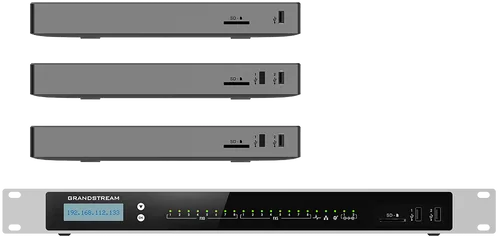
Grandstream UCM6302A IP PBX
An IP PBX for a mid-sized company, with two FXO and two FXS ports and a web console.
Further Reading
You Have a Panasonic PBX and Panasonic Has Left the Market
Panasonic has wound down its office communications business. The system installed in your office runs exactly as it did and will …

Server Pricing in Egypt: What You Are Actually Paying For
Two quotes for the same model, 40% apart. The gap is rarely margin — it is four line items that never appear in the model name.

New Server or Used? A Guide to Buying Refurbished Servers
"Refurbished" covers three different things in the local market: remanufactured by the vendor, refurbished by a third party, and …